
How to Choose an LMS in 2026: A Framework for Avoiding the $100K Mistake
There are hundreds of learning management systems in 2026, and every single one claims to be the best, the smartest, the most AI-powered.
A lot of that shopping is either happening for the first time or is driven by a replacement: low adoption, reporting nobody trusted, a bill that kept growing long after the contract was signed. That's not bad luck. It's common enough that it should change how you buy.
Here's what makes the decision expensive either way: enterprise platforms run into the $300 to $500 per user, per year, implementations take three to twelve months, and migrating off the wrong one later is brutal. Pick wrong and you're either living with 30% adoption or ripping it out to start over, all again.
So this guide isn't a feature list. It's the exact framework I would use to choose an LMS today, whether it's your first one or your third: how to define what you actually need, the five types of platform (so you don't overbuy), the must-have checklist for 2026, how to match the platform to your size, the buying traps that catch even careful buyers, and the evaluation process built to catch what a checklist alone misses.
By the end, you'll be able to walk into any demo and know within ten minutes whether you're being dodged or you're running the call.
Let's dive in.
Chapter 1: Outcomes First, Not the Feature List
This is the rule almost every buyer breaks.
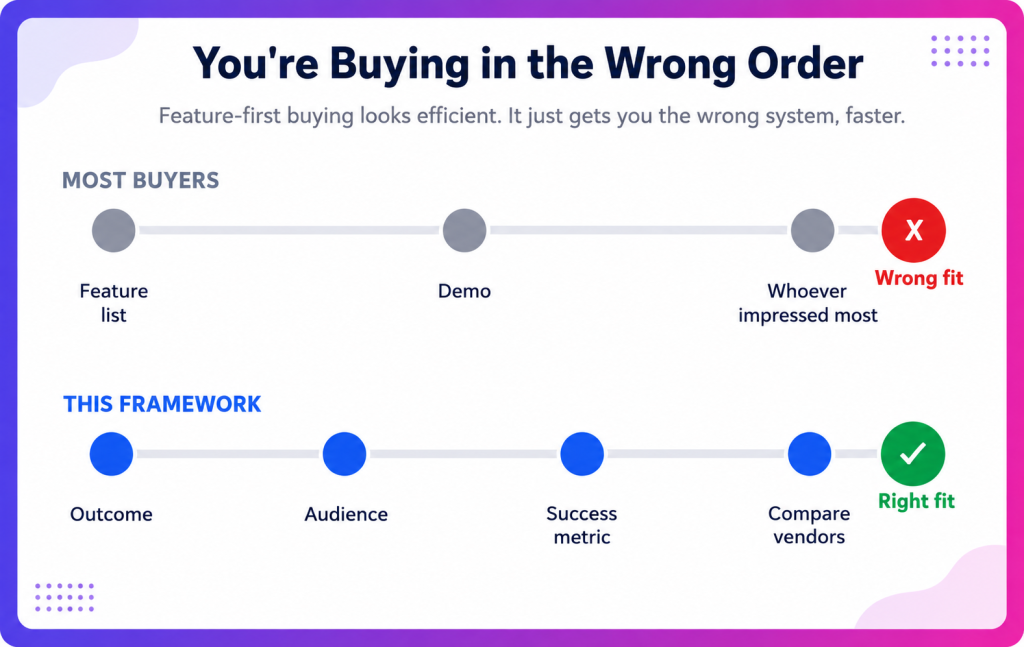
Most people start by comparing feature lists. That's backwards. The best LMS isn't the flashiest, it's the one that actually clocks in.
Pro tips: Before you look at a single vendor, answer three questions.
1. What business problem are you solving?
Not "we need training." What outcome are you trying to move? Maybe a faster onboarding, lower churn, compliance you can prove in an audit, or reps ramping to quota sooner? The answer determines everything downstream. There are LMSs built for specific purposes, for instance, an LMS built for hospitals is the wrong tool for onboarding sales reps.
2. Who are you actually training?
List every audience. Employees only, or employees plus customers, partners, and franchisees? Training external audiences is called extended enterprise, and not every platform supports it, so this one question can reshape your shortlist. Also note whether your people are desk-based or frontline and deskless. That changes the mobile requirement completely: for a deskless workforce, mobile isn't a nice-to-have, it's the only screen they'll ever open your LMS on.
3. How will you measure success?
Decide before you buy. If you can't name the metric the LMS needs to move (ramp time, retention, error rates, certification coverage), you'll end up measuring outcomes that have no actual business impact. Define the outcome first, then buy the tool that can prove it.
Write your must-haves versus nice-to-haves before the first demo. Skip this, and you'll walk out having agreed to "circle back next week" on a discount that was somehow only good for today.
Chapter 2: Know the 5 types of LMS, so you don't overbuy
LMS is broadly categorised into 5 categories. And buying the wrong type is the most expensive mistake in the whole process.
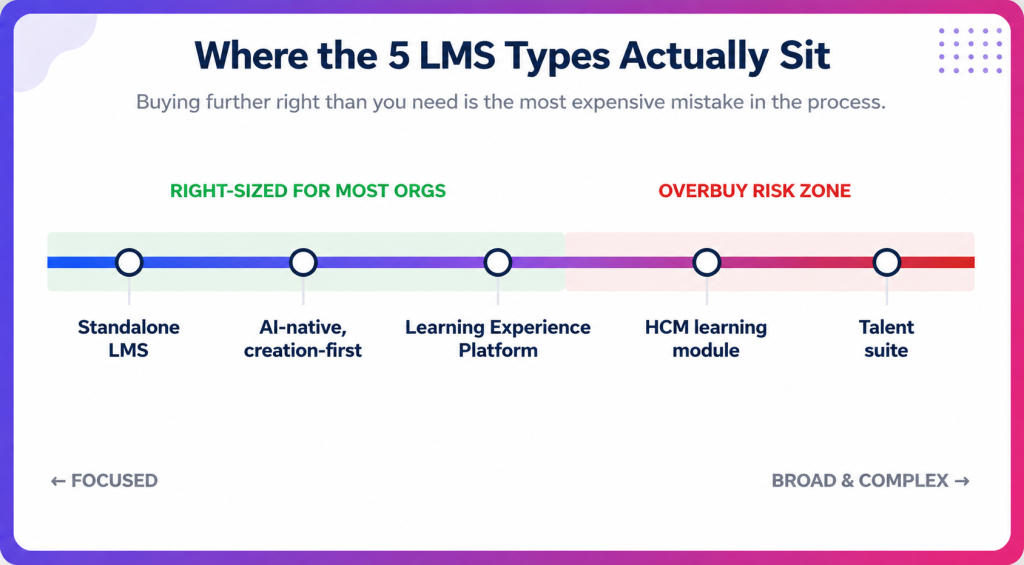
- Standalone LMS: A dedicated platform for delivering and tracking training. Focused, does one job well.
- AI-native, creation-first LMS: The most recent category to come into existence. These platforms generate the training using AI in addition to delivering them. Essentially you are less dependent on an authoring tool and giving the power to subject matter experts to create and deliver courses.
- Learning Experience Platform (LXP): Content-discovery-first, personalized feeds in the mold of a streaming service, built around curation and recommendations. It doesn't directly drive business outcomes but keeps and nudges learners to learn based on their interest levels and wishes.
- Talent suite: An LMS bundled with performance management, recruiting, and succession planning into one HR system: deepest breadth, most complexity. It's genuinely complex to run, but it earns that complexity for organizations that want learning tied directly to career growth, not treated as a separate box to check.
- HCM learning module: Training that lives inside an HR system of record like Workday, so learning data sits next to headcount and comp. Makes sense mainly if you're already running that HCM suite.
Most buyers overbuy: they purchase a talent suite to solve all problems and end up in a complex, confused state, while a focused standalone or AI-native tool would solve faster and cheaper.
If you don't genuinely need performance reviews and succession planning living in the same system as learning, don't pay to implement them. Match the type to the job first, then compare vendors within that type.
Chapter 3: The 2026 must-have checklist
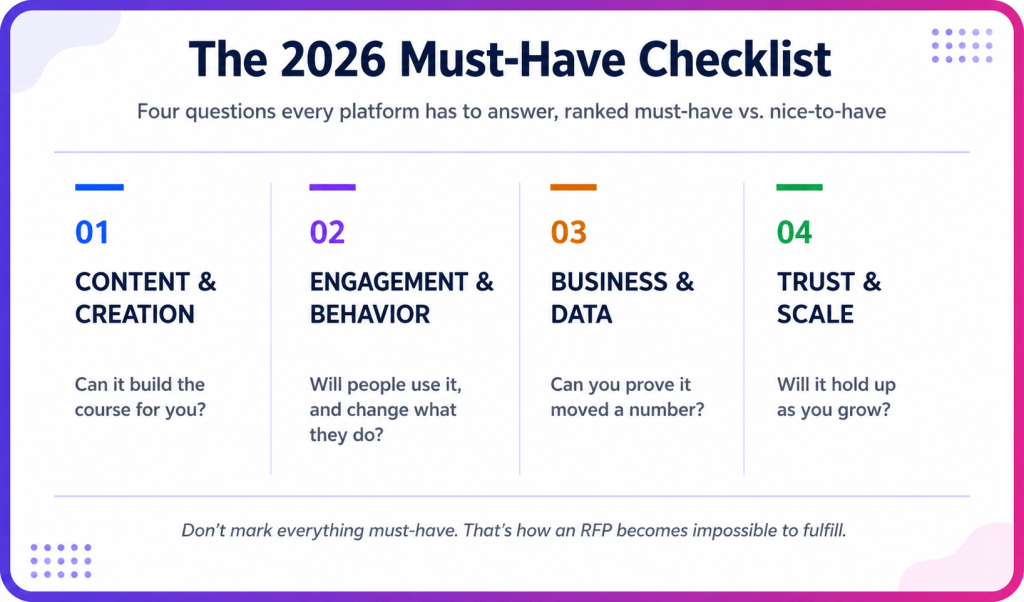
Once you know your type, evaluate specific capabilities. This is the checklist that actually matters in 2026, grouped so you can rank must-haves against nice-to-haves. Don't mark everything must-have. That's how an RFP becomes impossible to fulfill.
1. Content and AI Course Creation
- AI course creation is the biggest 2026 differentiator, because nobody ever struggled to deliver a course, they struggled to build one. Subject-matter experts are busy, and building a course by hand takes weeks. Look for AI that turns a document, a slide deck, or a topic into a full course with lessons and real scenarios in minutes, for learners meaningful practices.
- Authoring and content strategy decides whether you'll build content, curate it from a marketplace like LinkedIn Learning or Coursera, or both. If you have existing courses, confirm SCORM and xAPI compatibility so they carry over as it is.
- The fastest way to tell real AI from marketing AI is to ask the vendor to generate a course from your document, live, on the call. Real AI produces something usable in minutes. Marketing AI only works on a pre-baked example.
2. Engagement and Learners Behavioral Change
- Practice and AI roleplay: Most LMSs are delivery systems, they serve content and track completion. Completion isn't competence. The platforms worth paying for ‘let learners’ rehearse a sales objection, a difficult conversation, or a compliance decision against an AI that responds and scores them. This is what actually changes behavior on the job.
- Mobile and frontline support: If any of your learners are deskless (retail, manufacturing, hospitality, field sales), mobile first delivery is a necessity. Test it yourself, don't take the vendor's word for it.
- User experience and adoption: The best platform nobody uses is worthless. One survey signal worth remembering: a large share of enterprise buyers barely log into the tools they bought. Prioritize UX, because adoption is the metric behind every other metric.
3. Business and Data
- Reporting tied to outcomes, not activity: Skip vendors who only show completion dashboards. You need reporting that connects learning to business KPIs, ramp time, retention, productivity, so you can prove ROI rather than just delivery.
- Skills and personalization: Skills mapping and personalized learning paths are what separate a training platform from a performance engine. Ask how the platform maps content to skills and roles.
- Integrations, depth over logos: Your LMS has to connect to your HRIS, your CRM for sales training, SSO, and the tools people already work in, like Slack and Teams. Ask about API depth, not which logos sit on the marketing page. If a platform will build a custom integration for a tool that isn't on that logo wall, that's a real signal, not every vendor will extend their roadmap for one customer. Learning that flows into daily tools gets used; learning in a silo doesn't.
4. Trust and Scale
- Security and compliance: SSO, role-based access, SOC 2 or ISO 27001, and data residency if you operate across regions. For regulated, audit-heavy teams, this is where deals are won or lost.
- Extended enterprise: If you train customers or partners, confirm the platform supports multiple branded portals for external audiences.
- Scalability and pricing model: Understand total cost of ownership, not just the license, including implementation, integrations, feature gating (AI and analytics often cost extra), overage fees, and support SLAs. Whether the vendor offers a trial is itself worth checking, since the ability to test before you commit tells you a lot about how confident they are in the product.
Chapter 4: Match the LMS to your size and stage
The same platform that's perfect for a 20,000-person bank is a nightmare for a 60-person startup. Here's the honest matching guide.
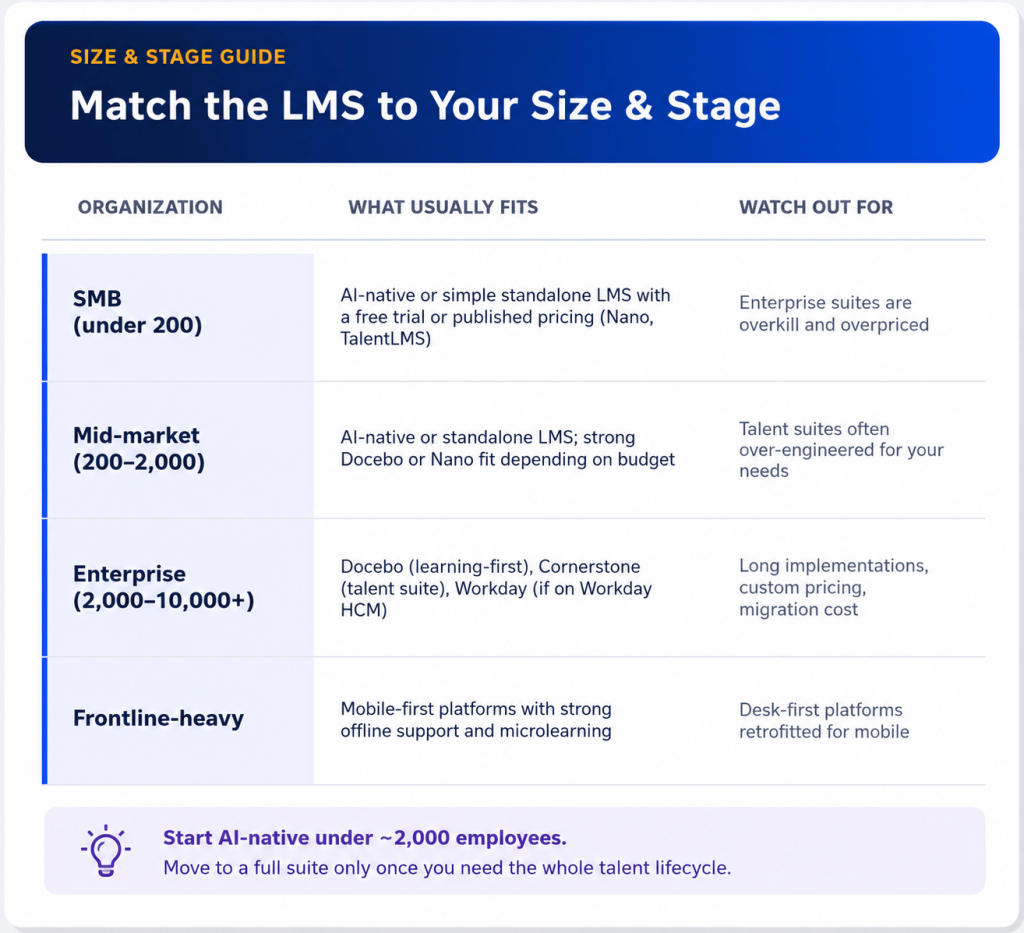
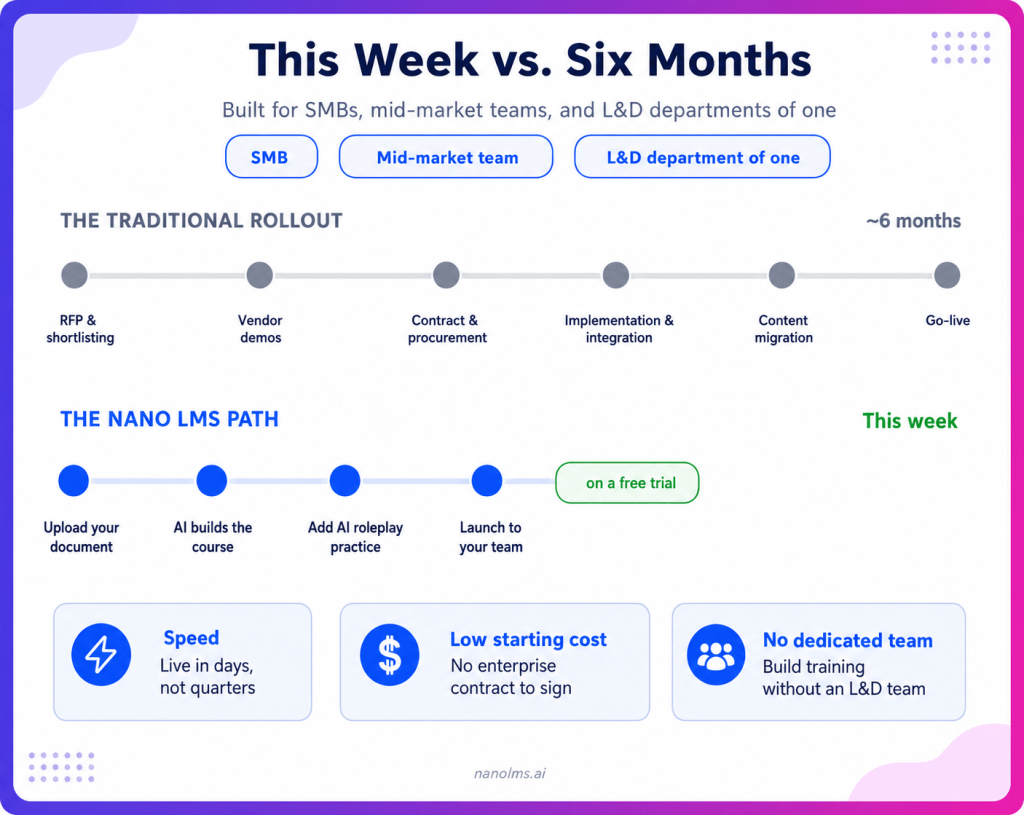
If you're an SMB, a mid-market team, or an L&D department of one, start with an AI-native, creation-first platform.
You want speed, a low starting cost, and the ability to build training without a dedicated team. That's the case for Nano LMS: it builds courses from your existing material in minutes on a free trial, and includes practice, so you can be running real training this week instead of after a six-month rollout.
| If you're a large, global, regulated enterprise that needs the full talent lifecycle and the deepest compliance, the enterprise suites earn their weight. Docebo for the strongest learning-first AI platform, Cornerstone for the full talent suite, Workday if you already run its HCM. We break those three down in detail in our Cornerstone vs Docebo vs Workday guide. |
Chapter 5: The 5 buying mistakes that cost people their jobs
The fastest way to make a good decision is to know the mistakes that wreck bad ones.
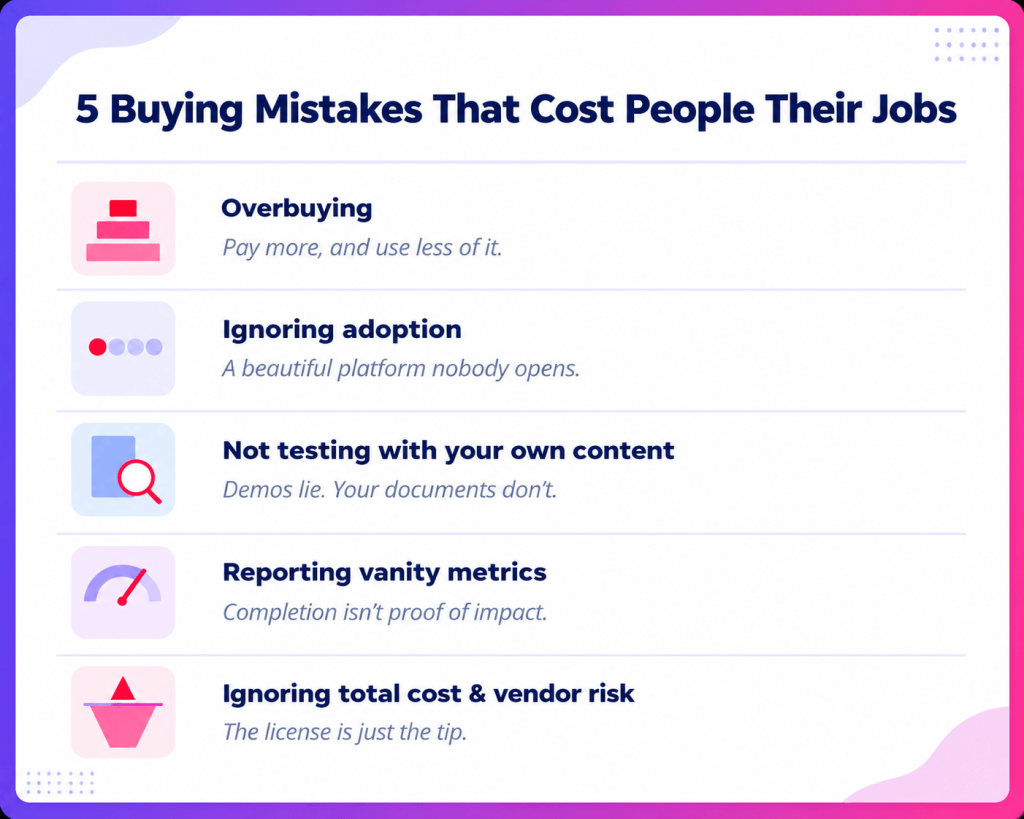
Mistake 1: Overbuying. Buying a heavyweight enterprise suite for a problem a lighter tool would solve. You pay more, implement longer, and adoption suffers because the tool is too complex. Match the type to the job.
Mistake 2: Ignoring adoption. Choosing on features while ignoring whether people will actually use it. A beautiful platform at 25% adoption is a failure. Weigh the learner’s experience heavily.
Mistake 3: Not testing with your own content. Vendors demo on a pre-baked example. Insist on a trial or a live demo using your documents, your scenarios, your use case. If they won't allow it, that's your answer.
Mistake 4: Reporting vanity metrics. Buying a platform that only measures completion and satisfaction. If you can't prove business impact, you can't defend the budget. Demand outcome reporting.
Mistake 5: Ignoring total cost and vendor risk. The license is the tip of the iceberg. Migration, integrations, and reimplementation costs often exceed it. Check vendor viability too: the LMS market is consolidating fast, and acquisitions or product sunsets can force an unplanned migration. Ask about roadmap, data ownership, and exit terms before you sign.
Chapter 6: The 6-step overall evaluation process to purchase an LMS
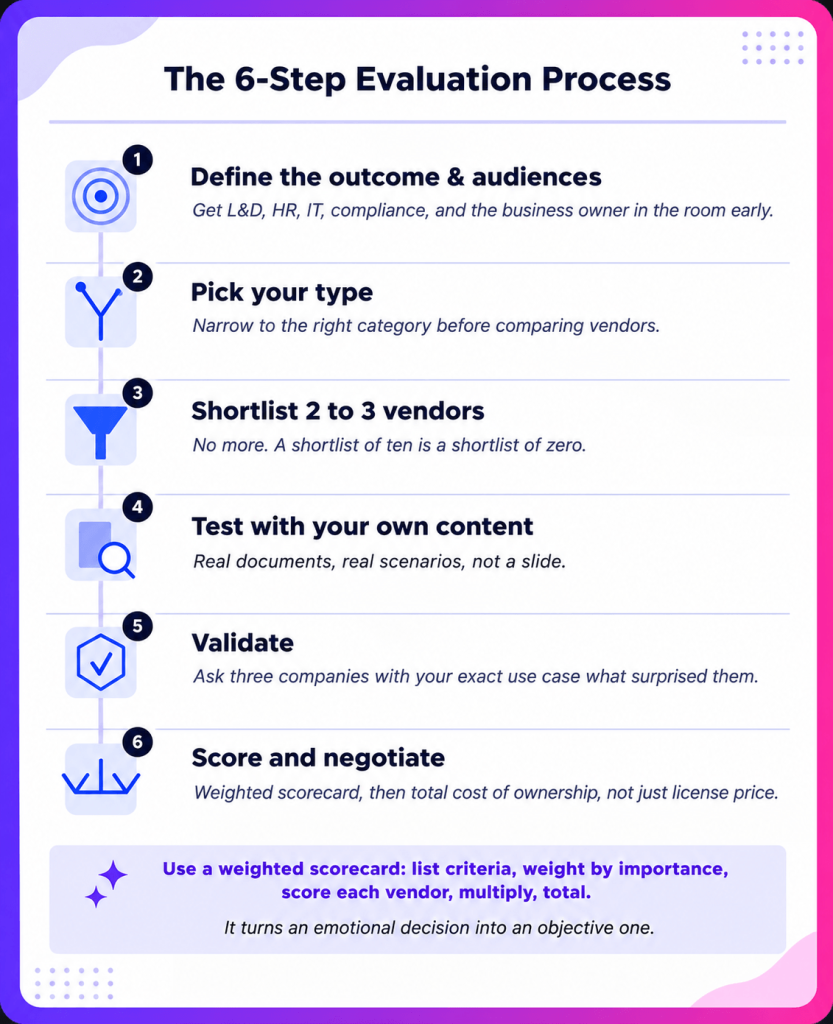
1. Define the outcome and audiences: Get L&D, HR, IT, compliance, and the business owner in the room early. Write must-haves versus nice-to-haves to define your outcome easily.
2. Pick your type: Narrow to the right category before comparing vendors, so you're comparing like for like.
3. Shortlist 2 to 3 vendors that meet your must-haves. No more. A shortlist of ten is a shortlist of zero.
4. Test with your own content: Run a trial or demo using real documents and scenarios. See the AI creation, the reporting, and the mobile experience in action, not on a slide.
5. Validate: Find three companies with your exact use case, not just your industry, and ask what surprised them after go-live. Check security, references, and SLAs. Pattern recognition beats feature checklists.
6. Score and negotiate: Rate each finalist 1 to 5 on your weighted must-haves, then negotiate total cost of ownership, not just license price. Nail down data ownership and exit terms before signing.
Use a simple weighted scorecard: list your criteria, weight each by importance, score each vendor, multiply, and total. It turns an emotional decision, who gave the best demo, into an objective one: who actually fits your needs.
The bottom line
The right LMS in 2026 fits your outcome, your audiences, your size, and your budget. Feature count doesn't decide that, adoption does: a platform your people pick up and use, not one they need a manual to get through.
Start with the business problem, then pick the right type before comparing vendors. Run every option through the must-have checklist and match it to your size. Avoid the five mistakes mentioned above, and test with your own content before you sign anything.
Do that, and you won't just buy an LMS. You'll buy the one you don't have to quietly explain in next year's 'lessons learned' deck.
Ready to test one with your own content?
The best way to evaluate any LMS is to try it on a document you already have. With Nano LMS, you can do exactly that on a free trial: upload a doc and watch it build a real course, then drop your team into an AI roleplay to see what practice-first learning feels like.
It's the fastest way to feel the difference between an LMS that delivers content and one that creates and proves it.
FAQ
1. How do I choose the right LMS?
Start with the business outcome you want to move and the audiences you're training, not the feature list. Pick the right platform type (standalone, LXP, talent suite, HCM module, or AI-native), run your options through a must-have checklist, match it to your organization's size, and test with your own content before signing. If the platform doesn’t have a free trial, you can always ask for an on-spot demo.
2. What LMS features matter most in 2026?
AI course creation, practice and AI roleplay, outcome-based reporting, skills and personalization, deep integrations (HRIS, CRM, SSO), mobile support, and security. AI authoring and personalization are what separate modern platforms from legacy ones.
3. How much does an LMS cost?
It varies widely. Enterprise platforms are usually custom-quoted and can run into the hundreds of dollars per user, per year, often via an RFP. SMB-friendly and AI-native platforms tend to offer trials or published per-user pricing. Evaluate total cost of ownership, not just the license.
4. What's the difference between an LMS and an LXP?
An LMS delivers, manages, and tracks structured training. An LXP is built around content discovery and personalized, self-directed learning feeds. Many organizations use an LMS as the backbone and layer LXP-style personalization on top.
5. Should I get a trial before buying an LMS?
Yes. Test the platform with your own documents and scenarios, not the vendor's pre-baked demo. If a vendor won't let you try it on your real use case, treat that as a warning sign.
6. What's the biggest mistake when choosing an LMS?
Overbuying: purchasing a complex enterprise suite for a problem a lighter, focused, or AI-native platform would solve faster and cheaper, then watching adoption suffer because the tool is too heavy for the job.