
Scenario-Based Learning: The Complete Guide (With 5 Branching Examples You Can Steal)
Here's a question that should bother every training team.
Why can someone pass your course with a perfect score on Friday, then completely freeze when a real customer yells at them on Monday?
The answer is simple. You taught them information. You never let them practice the decision. And information and decisions are two completely different things.
That gap is exactly what scenario-based learning closes. It's one of the most effective training methods we have, and most people still build it the slow, painful way or avoid it entirely because it sounds complicated.
This guide fixes both problems. By the end you'll understand exactly what scenario-based learning is, when to use it, how to design one, and you'll have five complete branching scenarios you can lift and adapt today. Let's go.
Table of Contents
- What Is Scenario-Based Learning?
- Why It Works (The Science of Learning by Doing)
- The Three Types of Scenarios
- When to Use Scenario-Based Learning (and When Not To)
- How to Build a Branching Scenario in 6 Steps
- 5 Branching Scenario Examples You Can Steal
- Example 1: Change Management (The Acquisition Announcement)
- Example 2: Customer Service (The Angry Refund)
- Example 3: Compliance (The Suspicious Email)
- Example 4: Sales (The Price Objection)
- Example 5: Safety (The Skipped Step)
- The Old Way vs The New Way of Building Scenarios
- Frequently Asked Questions
What Is Scenario-Based Learning?
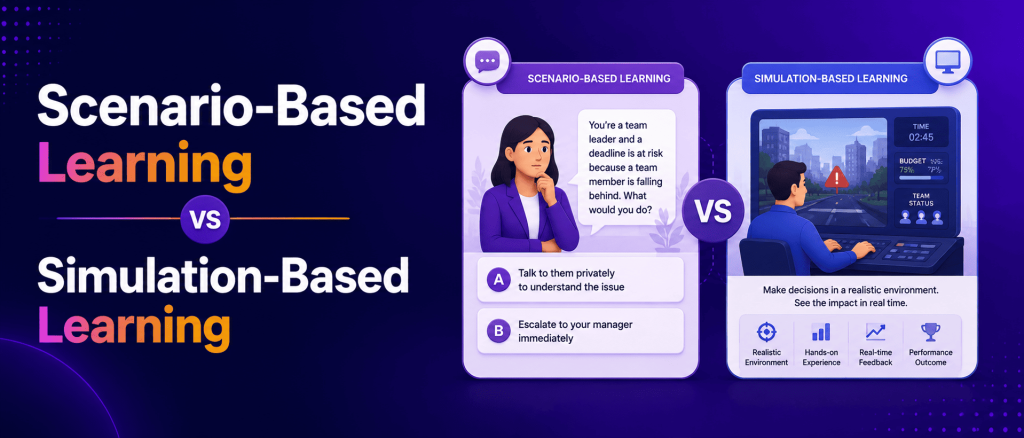
Scenario-based learning is a training method that drops the learner into a realistic situation, asks them to make a decision, and shows them the consequence of that choice. Instead of telling people what to do, it lets them do it, get it wrong safely, and learn from what happened.
That's the whole idea. You stop lecturing and start simulating.
Think about the difference. A traditional course says, "When a customer is angry, acknowledge their frustration before offering a solution." A scenario puts an angry customer in front of the learner and says, "She's furious. What do you say first?" Then it shows what happens based on what they pick.
One is a fact to memorize. The other is a decision to practice. People remember the second one because they lived it.
A few terms you'll see used interchangeably: scenario-based learning, scenario-based training, and situational learning all describe the same approach. Branching scenarios are a specific, more advanced form where each choice leads down a different path. More on that shortly.
Why It Works (The Science of Learning by Doing)
Adults are ruthless about relevance. They filter out anything that doesn't obviously apply to their job. The moment training feels abstract, attention drops and retention collapses.
Scenario-based learning solves this by making the relevance impossible to miss. When a learner sees a situation they recognize from their actual work, something clicks. They think, "This is about me." And the moment they think that, they're emotionally invested in finding the right answer.
Here's why the approach is so much stickier than passive content:
- It demands a decision. Passive learning lets you coast. A scenario forces a choice, and choosing makes you care about being right.
- It delivers consequences. When a wrong choice visibly makes things worse, the lesson lands harder than any bullet point could.
- It's safe to fail. Learners can make the costly mistake in the simulation instead of on a real customer, a real audit, or a real patient.
- It builds judgment, not just knowledge. Most workplace decisions live in gray areas. Scenarios train the judgment those gray areas require.
The data backs this up. Engagement and satisfaction scores tend to run dramatically higher with scenario-based learning than with traditional formats, because people are doing instead of watching. And doing is where behavior actually changes.
The real reason it sticks: Dual-Coding Theory
There's a deeper, well-established reason scenario-based learning outlasts a slide deck, and it comes from cognitive psychology. It's called Dual-Coding Theory, developed by Allan Paivio in the 1970s.
The idea is simple but powerful. Your brain processes information through two separate channels: a verbal channel for words and language, and a visual channel for images, scenes, and spatial information. When a piece of information is encoded in only one channel, it's fragile. When it's encoded in both at once, you build two separate memory traces for the same idea, and either one can pull it back later. Two roads to the same memory instead of one.
This is exactly why scenario-based learning is so sticky. A good scenario hits both channels at the same time. The learner reads or hears the situation (verbal channel) while picturing a real person, a real place, and a real moment of tension (visual channel). The angry customer isn't an abstract rule about de-escalation. She has a face, a voice, a counter she's leaning over. That dual encoding is what burns the lesson in.
It also explains why a rich, multimedia scenario beats a text-only one. When you add a character with a real voice, a branded environment, an on-screen email, background sound, and a decision the learner physically makes, you're feeding both channels deliberately, layer by layer. Every visual and verbal element is another hook into memory. This is the principle behind every well-built SBL course: don't just tell the story, make the learner see it and hear it while they live it.
Keep this in mind as you read the examples below. The best ones aren't sticky by accident. They're engineered to fire both channels at once.
The Three Types of Scenarios
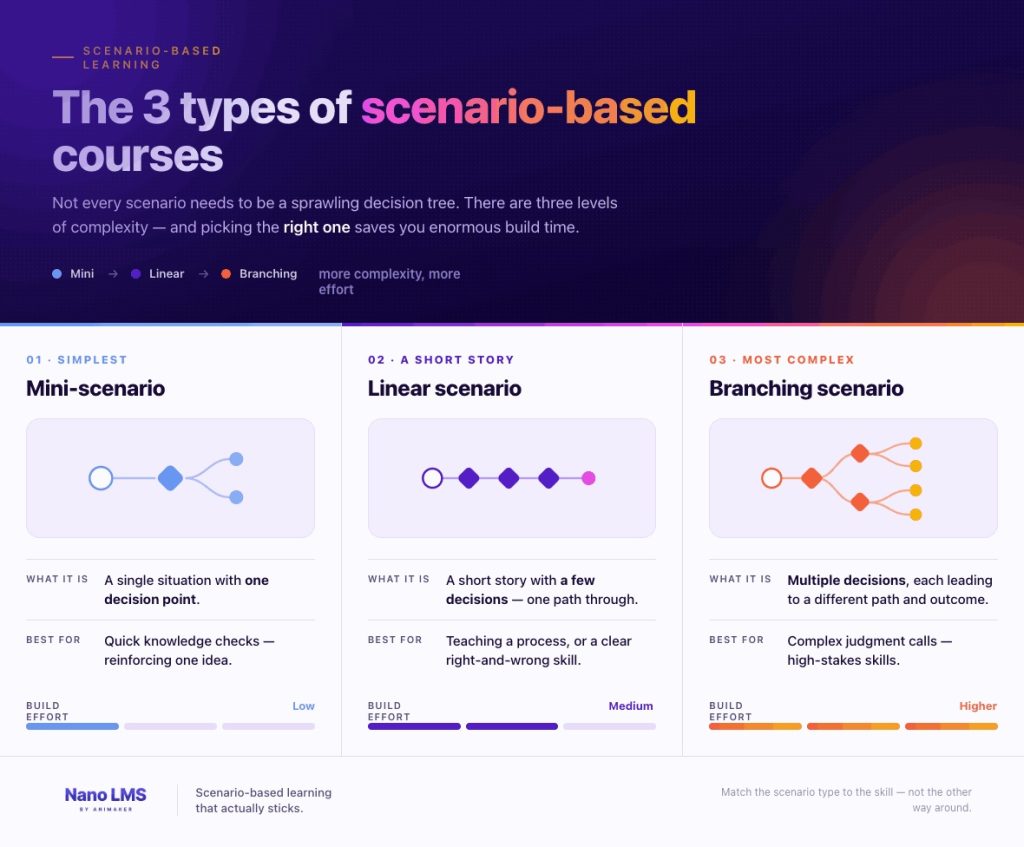
Not every scenario needs to be a sprawling decision tree. There are three levels, and picking the right one saves you enormous time.
| Scenario Types at a Glance | |||
Mini-scenario
|
|||
Linear scenario
|
|||
Branching scenario
|
Mini-scenarios are the workhorses. Two or three sentences, one decision, instant feedback. Perfect for dropping into a quiz.
Linear scenarios walk a learner through a sequence. They make a few choices, but the story funnels toward a single conclusion. Great for procedures.
Branching scenarios are the gold standard for judgment-heavy skills. Every choice opens a new branch, and the learner genuinely shapes the outcome. This is the "choose your own adventure" of training, and it's what the five examples below use.
A useful rule: use scenarios for strategic tasks that require judgment, not for simple procedural steps. If there's one correct sequence of buttons to press, a checklist is fine. If the right move depends on reading the situation, that's a scenario.
When to Use Scenario-Based Learning (and When Not To)
Scenario-based learning is powerful, but it's not the answer to everything. Here's the honest breakdown.
Use it when:
- The skill involves judgment, not just recall (handling an objection, defusing a conflict, spotting a risk).
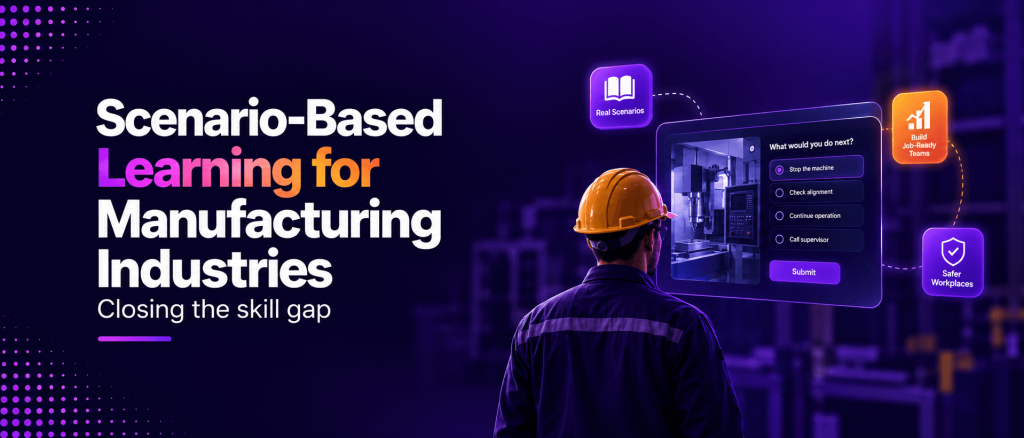
- Mistakes in real life are costly, dangerous, or hard to undo (compliance, safety, customer-facing roles).
- You're training soft skills that lectures never seem to fix (communication, empathy, negotiation).
- People "know" the rule but don't apply it under pressure.
Skip it when:
- The task is purely procedural with one correct sequence (use a checklist or a quick reference).
- You only need to convey simple facts (a short doc or a one-screen explainer is faster).
- The topic changes constantly and you'd be rebuilding the scenario every month.
The categories where scenario-based learning shines brightest are customer service, sales, compliance, leadership, cybersecurity, and health and safety. Notice the pattern: every one of those is about making the right call in a messy, real situation. That's the sweet spot.
Visual
Story
How to Build a Branching Scenario in 6 Steps {#how-to-build}
Here's the design process, stripped down to what actually matters.
Step 1: Define the one decision that matters. Don't start with content. Start with the real moment where people get it wrong. "New reps cave on price" or "staff click the phishing link." That moment is your scenario.
Step 2: Write the realistic setup. Set the scene the way it actually happens. Real characters, real pressure, real context. The opening should make the learner feel they're in it.
Step 3: Create the decision point with believable choices. Give three or four options. Here's the trick: every wrong option must be tempting. If the wrong answers are obviously dumb, you've taught nothing. The best distractors are the mistakes people genuinely make.
Step 4: Branch the consequences. The right choice moves the story toward a good outcome. Wrong choices make things visibly worse, then ideally give the learner a chance to recover. Watching it get worse is where the learning happens.
Step 5: Deliver feedback in the moment. Don't wait until the end. The instant a learner chooses, show them why that choice worked or backfired. Tie it to the consequence they just saw.
Step 6: Let them retry. Failing and trying again is the entire point. A learner who blows the scenario three times and finally nails it has practiced the real skill three times. That's a feature, not a bug.
Now, the part everyone admits but nobody likes to say out loud: building branching scenarios the traditional way is slow. It takes careful planning, real instructional-design skill, and hours of authoring in tools like Storyline or Captivate. The whole industry agrees branching scenarios take far longer to develop than linear content. Hold that thought, because the last section changes the math entirely.
First, your examples.
5 Branching Scenario Examples You Can Steal
These five are complete and ready to adapt. Each one is a real, buildable SBL course, the kind our team builds and puts through a 50-point QA pass before it ships. For each, you get the setup, the branching decision, the paths, and the lesson. More importantly, notice how each one is engineered to fire both memory channels from Dual-Coding Theory at once: a real voice and a real scene (visual) carrying the decision and its consequence (verbal). Swap in your own people, product, and policy, and you have a working course.
Example 1: Change Management, The Acquisition Announcement
The skill: Leading your team through the shock of a company acquisition.
This is our flagship example, and it's the richest. It opens on a real scene: a picture-in-picture message from the CEO plays inside the opening shot, and the actual acquisition email fills the screen so the learner reads exactly what the team just read. Two employees, Maya and Marcus, react in their own voices. From there the learner navigates nine branching paths. Every visual layer (the email, the CEO's face, the team photo that holds for a beat) is feeding the visual channel while the narration and dialogue feed the verbal channel. That's dual coding by design.
Setup: It's 9:02 AM. The acquisition email just hit every inbox. Maya, on your team, is already at your desk looking rattled. "Are we going to lose our jobs? Is this why they cancelled the offsite?" Marcus is quieter but clearly spinning. The whole team is watching how you react.
Decision point: What do you do first?
- A) Reassure them everything will be fine. → You don't actually know that, and the branch shows it backfiring. Two weeks later a layoff is announced and your team remembers you promised. Trust gone. The path teaches why false comfort is a trap.
- B) Tell them you don't have all the answers, but you'll share everything you learn as you learn it. → Honest and steadying. Maya's shoulders drop. The branch continues toward a team that trusts you through the uncertainty. Correct path.
- C) Stay heads-down and tell them to wait for official communication. → The branch shows the vacuum filling with rumor and Slack speculation by lunch. Silence from a leader is not neutral. It teaches that absence of communication is itself a message.
The lesson: In a moment of fear, your team doesn't need certainty you can't give. They need honesty and presence. Acknowledge the unknown, commit to transparency, and stay visible.
QA capabilities this course exercises: picture-in-picture CEO message, full-screen email overlay, multi-voice characters (Maya and Marcus), a held group still, and nine JSON-defined branching paths with brand-colored decision buttons.
Example 2: Customer Service, The Angry Refund
The skill: Defusing an angry customer while protecting policy.
A tight, voice-driven scenario. The learner hears the customer's rising tone (verbal and auditory channel) while seeing her lean over the counter as other shoppers turn to watch (visual channel). The pressure is felt, not described.
Setup: Dana storms up to the counter. She bought a blender three weeks ago, it broke, and your return window is fourteen days. She's loud, she's embarrassing you in front of other customers, and she wants a full refund right now.
Decision point: What do you do first?
- A) Explain the 14-day policy. → Dana gets louder. "I don't care about your policy!" The branch shows the situation escalating, then teaches: leading with policy when someone is emotional pours fuel on the fire.
- B) Acknowledge her frustration first. → "That's really frustrating, especially three weeks in. Let me see what I can do." Dana exhales. The temperature drops. Correct path, continues toward a workable solution.
- C) Immediately offer the full refund to make her stop. → Dana calms down, but the branch reveals the cost: you've just taught every customer who overheard that yelling works, and you've broken policy. The scenario shows the longer-term damage.
The lesson: Acknowledge the emotion before you address the policy. You can hold the line and be human at the same time.
QA capabilities this course exercises: multi-voice replacement, background ambience mixed under narration, music auto-ducking, and a 1.5-second silence marker at the decision point.
Example 3: Compliance, The Suspicious Email
The skill: Spotting and handling a phishing attempt.
Here the visual channel does heavy lifting. The suspicious email is shown full-screen so the learner studies the real artifact, the spoofed address, the urgency, the gift-card ask, while the narration walks the tension. Seeing the actual email is far stickier than reading a rule about phishing.
Setup: You get an email that looks like it's from your CEO. Subject line: "Quick favor, need this done now." It asks you to buy five gift cards for a client and send the codes urgently. The CEO is traveling and the tone feels rushed.
Decision point: What do you do?
- A) Buy the gift cards. It's the CEO. → The branch reveals the aftermath: the email was spoofed, the money is gone, unrecoverable. The scenario replays the red flags you missed: urgency, unusual request, gift cards.
- B) Reply to the email asking to confirm. → A dangerous middle ground. If it's a scammer, you've just confirmed you're a live target. The branch teaches why replying to a suspicious email is the wrong verification channel.
- C) Verify through a separate channel. → You message the CEO on Slack or call their known number. "Did you send this?" They didn't. You report it. Correct path. Threat neutralized.
The lesson: Urgency plus an unusual request plus an untraceable payment is the phishing fingerprint. Always verify through a channel you trust, never by replying.
QA capabilities this course exercises: full-screen email overlay, OCR brand-color extraction for the interface, SCORM 1.2 packaging, and xAPI event firing to track which branch each learner chose.
Example 4: Sales, The Price Objection
The skill: Handling "you're too expensive" without instantly discounting.
A conversation-driven branch where the buyer's voice and micro-reactions carry the scene. The learner hears the hesitation and sees the buyer's expression shift with each response, both channels tracking the same moment.
Setup: You're on a call with a promising prospect. Everything's going well until they say, "Look, I like it, but you're 30% more expensive than the other option. I can't justify that to my boss."
Decision point: How do you respond?
- A) Offer a discount right away. → You win the deal but train the customer that your price isn't real. The branch shows the margin you gave away and the precedent you set for every future negotiation.
- B) Ask what they're comparing you to. → "Help me understand what's in the other quote." You uncover that the cheaper option skips onboarding and support. Now you can speak to value. Correct path.
- C) Defend your price by listing features. → You talk for two minutes about everything you do. The prospect goes quiet and says they'll "think about it." The branch shows why feature-dumping never answers a value objection.
The lesson: A price objection is usually a value question in disguise. Get curious before you get defensive, and never discount on reflex.
QA capabilities this course exercises: multi-voice dialogue, caption translation (EN to FR, ZH, JA) for global sales teams, and resume-state so a rep can close the app mid-call-practice and return to the exact spot.
Example 5: Safety, The Skipped Step
The skill: Following lockout/tagout before servicing equipment.
The most physical of the five, and the one where visual encoding matters most. The learner watches the jammed machine, the backing-up line, the four-minute procedure, all on screen, while narration names the internal pressure to skip it. Seeing the near-miss is what makes it unforgettable.
Setup: A machine on the floor jams. You know how to clear it, you've done it a hundred times, and there's a line backing up behind you. Stopping to do the full lockout/tagout procedure will take four minutes you feel like you don't have.
Decision point: What do you do?
- A) Clear the jam quickly without lockout. → The branch shows the risk materialize: the machine cycles unexpectedly. Even with no injury this time, the near-miss is made vivid, and the path explains why "I've done it before" is exactly how injuries happen.
- B) Ask a coworker to watch the machine while you clear it. → A coworker watching is not a safety system. The branch explains why human attention is no substitute for de-energizing the equipment.
- C) Perform lockout/tagout, then clear the jam. → Four minutes. The line waits. Nobody gets hurt. Correct path. The scenario reinforces that the procedure exists precisely for the moments you feel too rushed for it.
The lesson: The pressure to skip the safety step is strongest exactly when the step matters most. Procedures protect you from your own experience.
QA capabilities this course exercises: mixed-codec video normalization, frame-rate sync across clips, alternate caption tracks including right-to-left Arabic, and a clean bundle under 500MB through smart compression.
The Old Way vs The New Way of Building Scenarios
Now back to the elephant in the room. Everything above is proven and powerful. So why doesn't every course use scenario-based learning?
Because historically, it's been slow and hard to build.
Authoring a branching scenario by hand means mapping every path, writing every branch, anticipating every wrong turn, and wiring it all together in a tool with a real learning curve. The entire industry agrees on this: branching scenarios take significantly more time, planning, and instructional-design skill than linear content. That cost is the only reason this method isn't everywhere.
That math has changed.
With an AI-native platform like Nano LMS, you describe the scenario the same way you'd explain it to a colleague. "A new rep is on a call and the prospect says we're too expensive. Build me a branching scenario where they can discount, get curious, or feature-dump, and show the consequence of each." The AI drafts the branches, the consequences, and the feedback. You edit instead of build.
That single shift is what takes scenario-based learning from "the thing we'd do if we had time" to "the thing we do by default." The method was never the problem. The build time was. And now the build time is gone.
So take any of the five examples above, describe it to the AI, and you'll have a working branching scenario before your coffee's cold. That's the whole point of this guide: the best training method we have is finally fast enough to actually use.
Frequently Asked Questions
What is scenario-based learning? Scenario-based learning is a training method that places learners in a realistic situation, asks them to make a decision, and shows the consequence of that choice. It teaches judgment by letting people practice real decisions in a safe environment instead of just memorizing information.
What is the difference between scenario-based learning and branching scenarios? Scenario-based learning is the broad approach. A branching scenario is a specific, advanced form where each choice leads down a different path with different outcomes, like a "choose your own adventure" story. All branching scenarios are scenario-based learning, but not all scenario-based learning branches.
When should I use scenario-based learning? Use it for skills that require judgment rather than rote steps: customer service, sales, compliance, leadership, cybersecurity, and safety. Skip it for purely procedural tasks where a checklist works better.
How long does it take to build a branching scenario? Built by hand in traditional authoring tools, a branching scenario can take days because every path and consequence is mapped and written manually. With an AI-native platform, you can describe the scenario in plain language and generate a working first draft in minutes, then refine it.
Does scenario-based learning actually improve retention? Yes. Because learners make decisions and see consequences rather than passively reading, engagement and retention run significantly higher than with traditional formats. People remember what they did far better than what they were told.
Why is scenario-based learning so memorable? It's grounded in Dual-Coding Theory, developed by Allan Paivio. The brain stores information through two channels, verbal and visual, and a good scenario engages both at once: the learner reads or hears the situation while picturing a real person, place, and decision. Encoding the same lesson in both channels creates two memory traces instead of one, which is why scenarios stick far longer than text alone.
Want to turn any of these five examples into a real, playable course? Nano LMS builds branching scenarios from a plain-language description in minutes, with AI roleplay and mobile delivery built in. Free to start, no credit card.